Image: OpenAI, from the official OpenAI announcement
OpenAI just turned every ChatGPT plan into a small animation studio. Images 2.6, released on 4 November, makes GIFs: a product shot becomes a loop, a sketch becomes a moving mascot. A looping product animation used to mean a motion designer, a brief and a $500 invoice. Now it’s one photo and one well-written prompt.
Most people will make memes. I’d rather make invoices. Skipping the feature list.
I tried it
Before telling you to sell it, I made one: “Make an animated looping GIF: an industrial pneumatic parallel gripper (brushed aluminium body, two steel fingers) slowly opening and closing on a small machined steel part, clean light-grey studio background, soft lighting, fixed camera, 6 frames, last frame flows back into the first. No text, no logos, no labels, no borders.”
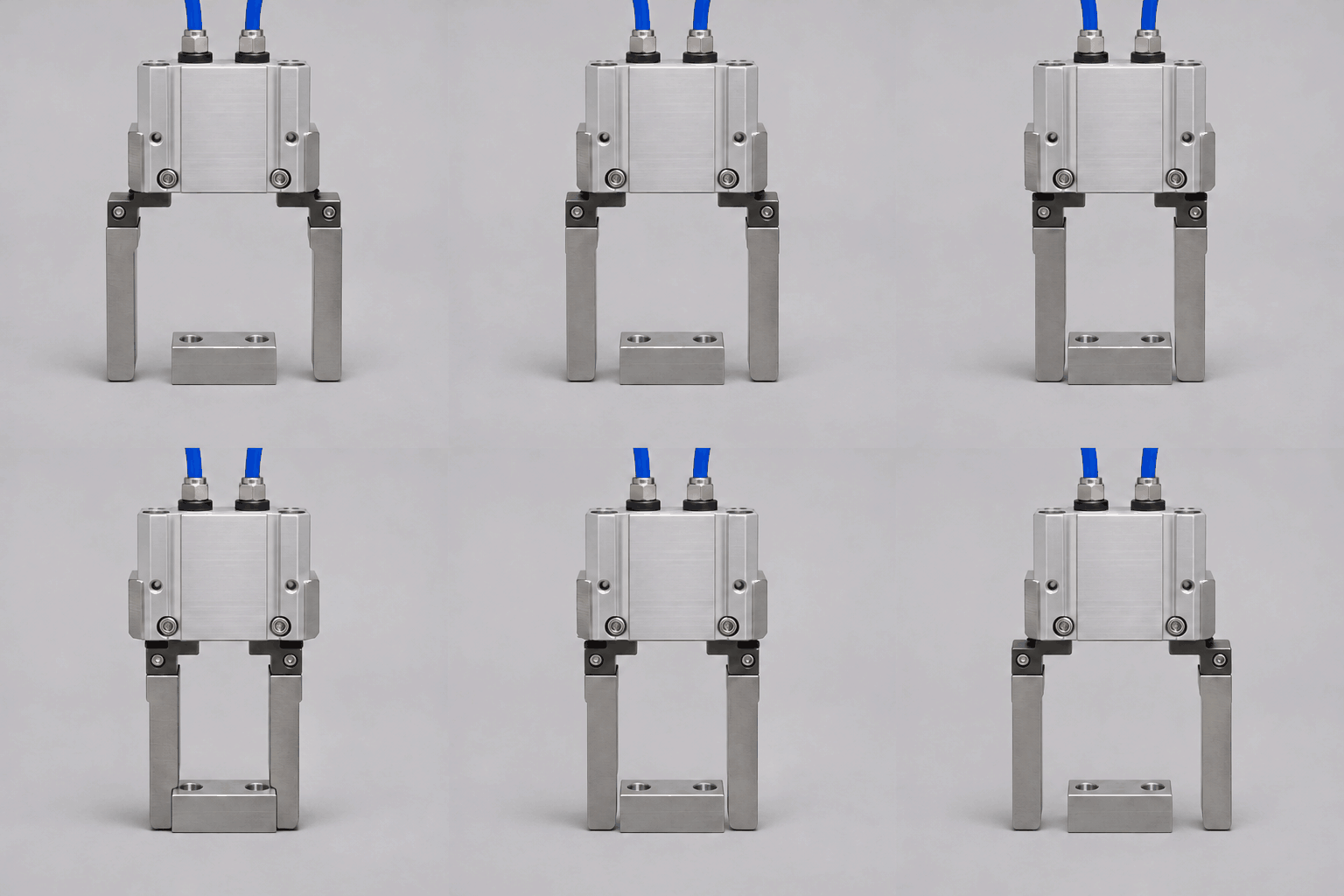
Made by me with ChatGPT Images 2.6 on 6 November 2026, Plus plan. Unedited.
It took about four minutes: ChatGPT drew the frames, caught misaligned fingers, fixed them, then stitched the GIF. The body, fittings and blue air lines stay identical in every frame, which is the hard part. The bad news is six frames looks choppy rather than smooth, and the fingers never lift the block. Fine for an email or LinkedIn post; for a client’s product page I’d ask for more frames and start from their real photo.
Play 1: Sell a $900 product-loop pack to distributors
The money: Distributors sit on hundreds of flat, white-background product photos nobody looks twice at. A short loop that turns the product or opens the gate works on a product page, an email header or a LinkedIn post. Sell ten loops for $900, then $300 a month for four new ones.
How I’d run it:
- Get the client’s best product photos, one product per image. Upload them into one ChatGPT conversation; OpenAI says 2.6 keeps products and brand details consistent as you edit.
- Borrow the trick OpenAI’s own examples use: ask for a sprite sheet of equal frames that loops back to the start. Prompt: “Using this exact product photo, create a single animation sprite sheet for a seamless looping GIF: 6 equal frames in a 3-by-2 grid, the product slowly rotating 60 degrees per frame on a clean light-grey background, soft studio lighting. Keep the shape, colours, ports and fittings exactly as in the photo. No text, no logos, no labels, no borders.” Then ask for the GIF.
- Check each loop against the real photo: fittings, bolts, colour, cable exits.
- The client’s product manager signs off every loop before it goes anywhere.
- First buyer: a distributor with a dull website. Make one loop of their best-seller on spec and send it with the price for nine more.
The maths, as an example: ten loops at about 20 minutes each, including checking, is under four hours of work for $900. Three clients on the $300 monthly top-up is $900 a month of recurring work for maybe five hours.
Play 2: Sell an animated mascot for $2,000
The money: OpenAI pitches this at marketers animating a brand mascot. Plenty of businesses have a mascot sitting dead on a business card. Sell a mascot pack: six to eight GIFs (waving, thumbs up, “thinking”, celebrating a win, apologising for a delay) for $1,500–$2,500.
How I’d run it:
- Start from the mascot artwork the client already owns, or a rough sketch; OpenAI says even a simple sketch can become an animated character. Upload it at the start of the conversation.
- Prompt per pose: “Using this mascot exactly as drawn, create a sprite sheet for a seamless looping GIF: 6 equal frames in a 3-by-2 grid showing it giving a thumbs up and a small happy bounce, ending in the starting pose. Same proportions, colours and outfit in every frame. Plain white background. No text, no words, no borders.”
- Redo any loop where the mascot drifts between frames.
- Get it in writing that the client owns the mascot design.
- First buyer: any business with a mascot on its van. Show them one free waving loop; the other seven sell themselves.
The maths, as an example: eight loops is a day’s work including revisions. At $2,000 a pack, two packs a month is $4,000.
Play 3: Put a moving product in your own quotes
The money: This one wins work rather than selling it. A quote follow-up is usually a PDF and a polite nudge. Add a loop of the actual machine doing the customer’s job and you stop looking like the other three quotes in their inbox.
How I’d run it:
- Make one honest loop of each of your five most-quoted products.
- Prompt: “Using this photo of our machine, create a sprite sheet for a looping GIF of it running its normal cycle: 6 equal frames, 3-by-2 grid, same camera angle, realistic industrial setting. Do not add features that aren’t in the photo. No text, no logos, no people.”
- Your engineer checks each loop; bin any that shows a motion the machine can’t do.
- Drop the loop into the quote follow-up email, right above the price summary.
The maths, as an example: I won’t invent a click rate. If you quote $40,000 jobs and the loop wins you one extra a year, that’s $40,000 from an afternoon’s work.
How I’d actually do it
Play 1 first. Product photos already exist, the buyer understands it in five seconds, and the monthly top-up turns a one-off into income. Play 2 pays better. Play 3 you should just do on Monday.
Ignore the meme demos, and don’t promise anyone video; these are short loops, not a product film. Caveats: OpenAI hasn’t said how many GIFs each plan gets before limits bite, so test on your plan before taking on a 50-loop job. And everything customer-facing gets a human check against the real product: an animated product that misrepresents what the customer is buying is worse than no animation at all.
Where this fits
For longer explainers, see selling $750 explainers with Claude Motion. For loading the loops onto product pages, ChatGPT in Chrome can do the catalogue loading.
What shipped, for reference: Images 2.6 is available globally from 4 November 2026 in ChatGPT and Codex on every subscription tier, on desktop, mobile and web. It adds GIF creation, better consistency of characters and products across edits, and 50% faster generation (OpenAI’s figure). Developers get two API models, GPT-Image-2.6 Flare (faster) and Sunburst (higher quality), plus image markup, SVG export and a new complexity setting; API pricing is on OpenAI’s pricing page.
Source: OpenAI, “Introducing Images 2.6”.